Remember my first and only WordPress plugin? Well it just got better.
Snips 2.0 is basically Snips rewritten from scratch, updated to fit WordPress’ Shortcode API. Let’s see how good it is…
Tired of having to copy paste nasty HTML code from sites such as YouTube, Vimeo and so on? Looking for a way to insert recurrent content in your posts without having to type it every time? Would like to be able to inject parameters in these snippets? Well, now you can.
Just install Snips and use the bundled shortcodes or create/edit your own!
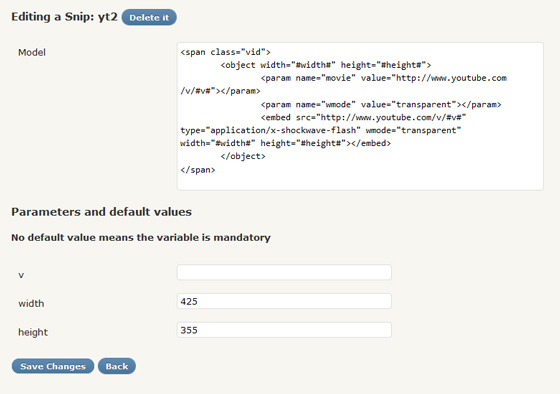
Each Snip is a combination of a name, a model and optional parameters. The name defines the shortcode tag you will be able to use, the model is the content that will replace your shortcode calls and the parameters (that look like #the-parameter# in the model) are portions of the model that can change from a call to an other. Those parameters can have default values or can be left empty and then become mandatory.
All of this can be edited via a simple UI, found under Settings > Snips… Here’s screenshot:
For those that used Snips’ first version: (0.2) everything should be OK, the previous syntax will work ; but I recommend using the new one and the corresponding updated model files (ex: yt becomes yt2). Also, the #up# parameter (used in mp3 and swf snips) has to be set manually to your blog’s upload path.
If you use it and find bugs, please let me know! This is the first time I use jQuery behavior (for the parameters’ detection in the Settings page) so it could act a little weird.