Shrink O’Matic 2

Back in 2008 I would spend some of my Sat­ur­day after­noons sit­ting in a Laun­dro­mat, wait­ing for my clothes to smell good. I quickly real­ized these moments were per­fect to bring my lap­top with me and code. One of the first AIR apps I wrote was Shrink O’Matic, now you know where the name comes from.

It quickly became suc­cess­ful. It now has been down­loaded 168,000+ times, a best-seller of sorts. Except it’s free.

But with suc­cess comes feed­back, and with feed­back comes fea­ture sug­ges­tions. Most of them were included through updates, some of them didn’t make the cut. Prob­a­bly because of me being lazy or because of AIR’s limitations.

Then AIR 2 came out, then I learnt Robot­legs… So I re-wrote it from scratch! Intro­duc­ing Shrink O’Matic 2, the same quick and sim­ple app but with more fea­tures and a nicer theme.

Here’s what’s fresh off the oven:

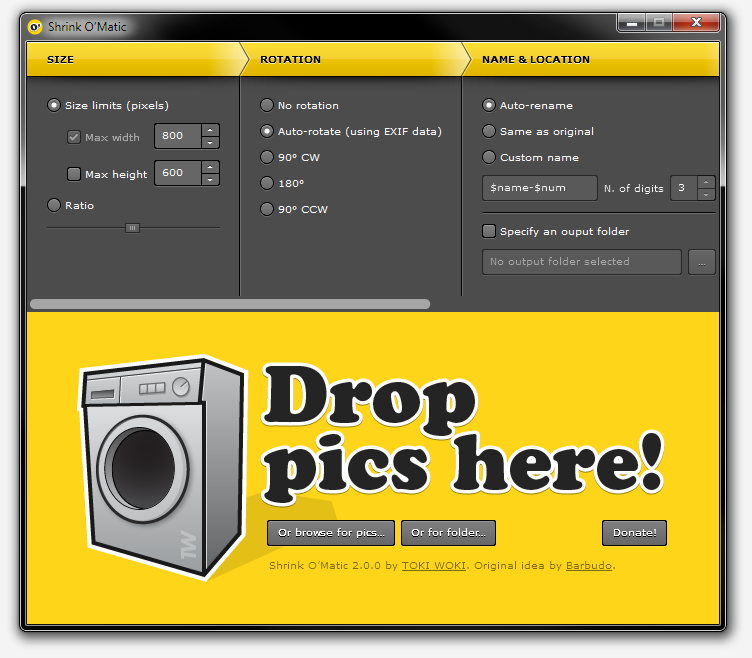
  • Drop fold­ers onto the app: every image in it (or in its sub-folders) will be shrinked.
  • New “Rota­tion” set­tings pane: either use a spe­cific angle or let the app read your images’ EXIF data and decide what to do.
  • Cus­tom name option: choose exactly what the out­put name will be using your own pat­tern and inject­ing the orig­i­nal file’s name (using $name) and/or its posi­tion in the queue (using $num).
  • PNG files now keep their trans­parency when shrinked.
  • Water­mark: water­mark your images, even choose where to place the overlay.
  • Drop files onto the app while it’s pro­cess­ing, no problemo!
  • No more dimen­sion limits.
  • Shiny new theme!

But! I decided some fea­tures had to go. I removed the “name pre­view” that used to be in the sta­tus bar. I also removed the abil­ity to drop images from web pages. If you need these fea­tures and want them back, make sure to drop a com­ment and let me know!

That’s it, go get it!

Meanwhile, in the kitchen…

Hey every­one, what’s up? Made it to 2012? Me too!

My girl­friend and me wanted to exper­i­ment a lit­tle for our new year wishes, so we looked at what was handy and came up with this lit­tle video… We know it’s not per­fect but we’re pretty happy with it. Tell us what you think!

Thanks to Craig Bald­win for his great stop-motion tuto­r­ial on Adobe Pre­miere, pretty use­ful for a new­bie like me. The sound­track is home made, thanks to this cool MIDI file.

Wanna lis­ten to the full-length ver­sion? Here it is.

<a href="http://toki-woki.net/blog/wp-content/uploads/mp3/tetris-2012.mp3">tetris-2012</a>

Happy new year every­one; 2012 is going to be a piece of cake!

W-Architectures

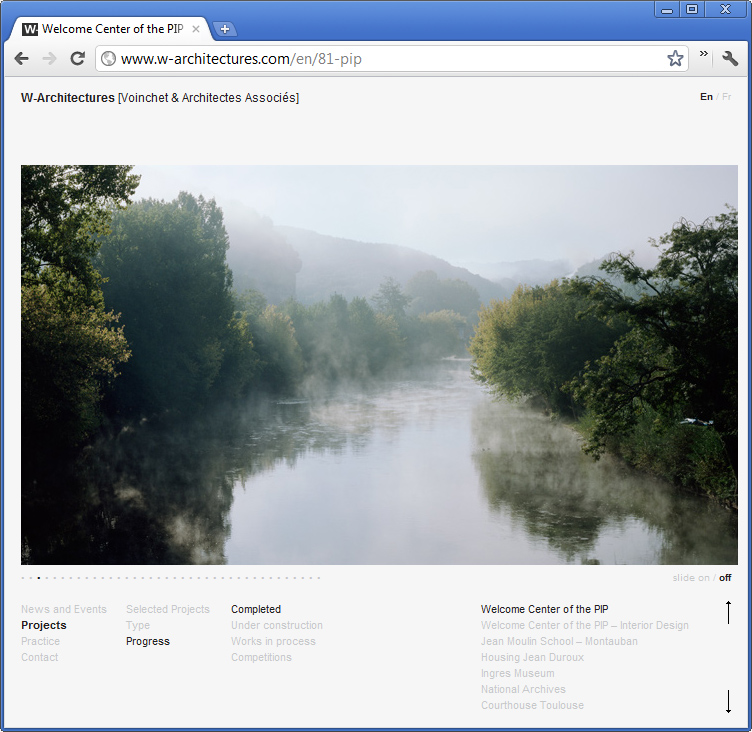
W-Architectures is an archi­tec­ture and urban-planning agency. The firm brings together a highly-qualified team of archi­tects with inter­na­tional expe­ri­ence.” This is how they intro­duce them­selves and I couldn’t have said it bet­ter myself.

I recently pub­lished their brand new web­site, designed by Chris­telle Bon­net and devel­oped by me. It’s been a pretty long process (they are very busy guys) but it’s here and I like it!

I used mostly Word­Press and MooTools to develop it. Every­thing was designed to be light and sub­tle, I think I can safely say that it is.

Eltono – Traces

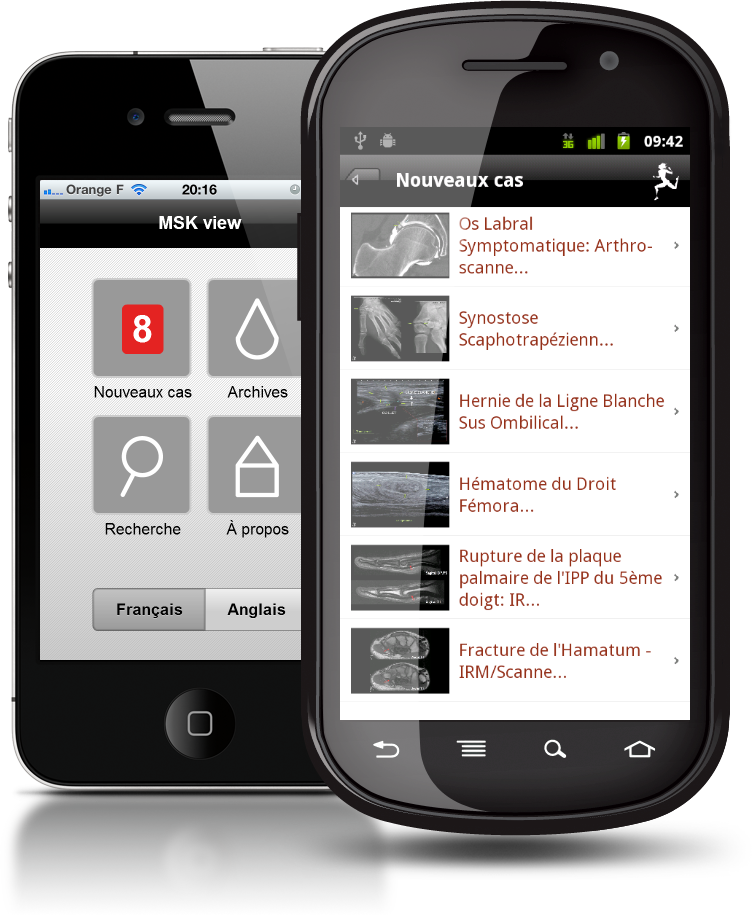
MSK view, for iOS and Android

I’ve been work­ing on an app for a French sport hos­pi­tal, designed to browse its msk image library. It’s called “MSK view” and it is avail­able for free in iTunes (iPhone and iPad ver­sion) and in the Android Mar­ket.

Pretty tech­ni­cal stuff in it, not sure every­one will want to install it but hey, there may be some doc­tors out there!

The hos­pi­tal is French but the app is both in French and Eng­lish. Built in Flash Builder with Flex Mobile, Robot­legs and AMFPHP, UI design by Jumo.

Now go show off brows­ing images of “Scapho­trapezial Syn­os­to­sis” or “Rec­tus Femoris intra­mus­cu­lar Haematoma”, what­ever it may be!

Boks is now OpenSource

Boks is one of my most suc­cess­ful apps and this is prob­a­bly not only because of its use­ful­ness, but also because it is free, too. I released it more than 2 years ago and it is still heav­ily downloaded.

The CSS com­mu­nity is really active and fast-moving. When I wrote Boks, Blue­print CSS was one of the most watched and forked project on GitHub which is mostly why I chose to base my UI and logic on it (it still is at the top, by the way). But with today’s CSS3 hype and because of the ever-growing list of CSS frame­works (not going to list them here) I started receiv­ing lots of fea­ture requests.

At first I thought I could wait and han­dle them later, but I quickly real­ized it would need a lot of time, and I defin­i­tively didn’t have it in my hands (or at least not for this project). The idea to Open­Source it seemed obvi­ous and I’ve been slow doing so, but here it is. If anyone’s will­ing to take a look at what I wrote and fix or improve it, do it! Don’t for­get that this has been writ­ten a while back and I wouldn’t re-write it this way (think Robot­legs); I know the code will look crappy to some but hey, we all learn and evolve, right?

I’ve licensed Boks’ source under GNU GPL v3 in order for it to remain Open­Source, but if you have other sug­ges­tions, just tell me.

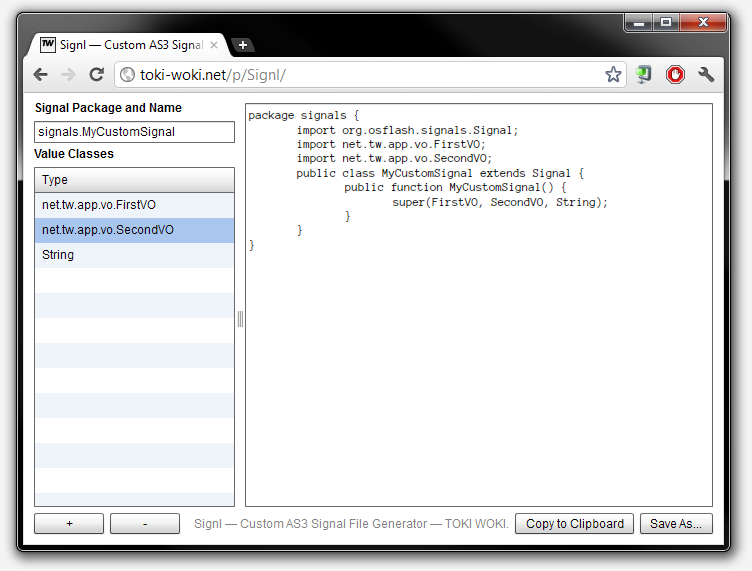
Signl – A Custom AS3 Signal File Generator

Remem­ber Evnt, the quick and sim­ple UI to gen­er­ate AS3 Event subclasses?

Well, it’s still here but I don’t use it much any­more, since I’m a big fan of Robert Pen­ner’s Sig­nals! So I wrote Signl. It’s basi­cally the same thing, but for Signals.

I know writ­ing Sig­nal classes is an easy task; but, why not make it eas­ier? I hope this helps! Oh, and by the way, it’s Open­Source, just like Evnt was.

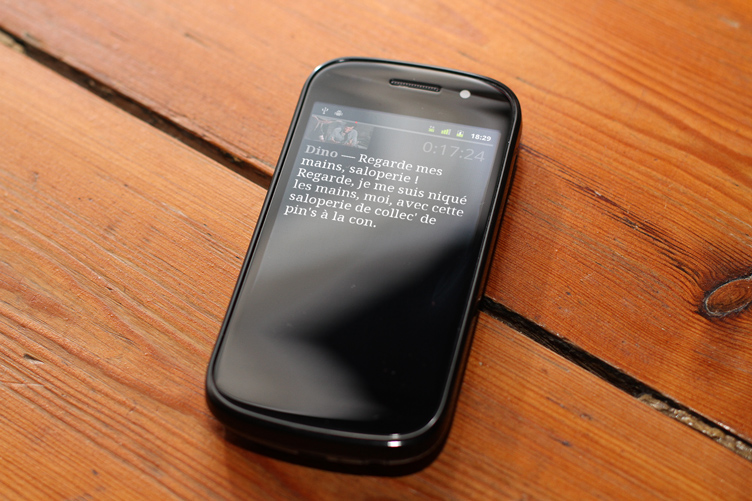
La Classe Américaine – Android

Hey, fel­low english-reading vis­i­tor, this post is going to be in French! Hope you don’t mind.

Si comme moi vous ne pou­vez pas vous empêcher de dire “flim”, “ouiche” ou encore “un pour l’argent, deux pour le spec­ta­cle et trois pour le cail­lou”, cette appli­ca­tion est pour vous.

Après une semaine de vacances avec une per­sonne touchée par cette mal­adie et sans avoir accès à Inter­net j’ai vite réal­isé qu’il me fal­lait une appli­ca­tion con­tenant tout le script de ce mag­nifique flim : La Classe Améri­caine. Je savais qu’un fou avait déjà fait tout le sale boulot et qu’il ne me restait plus qu’à extraire ces don­nées et créer l’interface pour les parcourir…

Grâce à Google Chrome et ses Out­ils de développe­ment j’ai pu injecter MooTools dans la page. Petite astuce très sim­ple et très pra­tique (script à copier/coller dans la console) :

var scriptNode = document.createElement('SCRIPT');
scriptNode.type = 'text/javascript';
scriptNode.src = 'https://ajax.googleapis.com/ajax/libs/mootools/1.3.2/mootools-yui-compressed.js';
var headNode = document.getElementsByTagName('HEAD');
if (headNode[0] != null) headNode[0].appendChild(scriptNode);

Après ça, quelques lignes pour extraire les don­nées, les net­toyer et les stocker directe­ment dans le presse-papier au for­mat JSON :

var data=[];
var images=$$('table.script img');
for (var i=0; i<images.length; i++) {
    var tr=images[i].getParent().getParent();
    var o={};
    var scriptTag=tr.getElements('td')[2];
    scriptTag.getElements('a').dispose();
    data.push({
        ts:tr.getElement('small').get('text'),
        script:scriptTag.get('html')
			.split('’').join("'")
			.replace(/\n/, '')
			.replace(/<br>\n$/, '')
    });
}
console.log(data.length);
copy(JSON.encode(data));

Un petit coup de Flash Builder, saupoudré de Robot­legs et hop, une appli Android ! Pas de ver­sion iPhone pour l’instant, mais si quelqu’on m’offre de quoi me payer un cer­ti­fi­cat de développeur, je ne dis pas non !

Au revoir, Messieurs-Dames. C’est ça, la puis­sance intel­lectuelle. Bac + 2, les enfants.

Buck 65 – Superstars Don’t Love

abc litera