When writing in French I’m always looking for characters that can’t be easily typed with a keyboard (like œ, for example). I used to go to copypastecharacter.com for its simplicity: just go to that page, click on a character and boom, it’s in your clipboard, ready to be pasted!
But I wanted something more powerful/thorough that would remember my frequently used characters. So I wrote Unipasta!
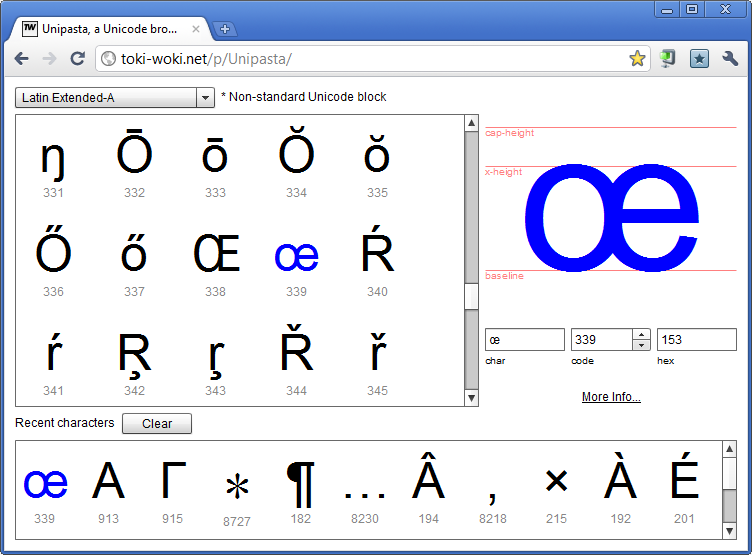
Here’s what you should know about it:
- Every input under the selected character (char, code and hex) can be edited and will update each other. Easily jump to any character!
- The font metrics (baseline, x-height and cap-height) are auto-calculated and will help you know where the char lives;
- Click on the “More Info” link to jump to fileformat.info and access a lot of details about the selected character;
- Every character your click will be automatically copied to your clipboard, handy!
- Use the “Recent characters” list to quickly access your favorite ones (latest used will always be listed first).
If you think some missing Unicode blocks are important to you or if you’d like to add a new character listing, just ask for it!

I’m big, now.

Blog is three, wee!

I recently started working with Robotlegs on a daily basis and I’ve never had to write that much custom event classes, so I felt like it was starting to be a little bit boring… That’s why I wrote a pretty basic/simple app that does hard part for you!

Simply enter you custom event’s class name and package, drop in some constants and properties: you’re all set!
Pro-tips:
- Reorder the constants and properties by dragging and dropping them
- Use custom types for the properties, imports will be taken care of for you
- Hit “Copy to Clipboard” or “Save As…” for a quick export!
Project is brand new so it might require some fixes or improvements… If you have ideas, please share!
And before you ask: no, it wasn’t written with Robotlegs… But it’s OpenSource so if you want to take a spin and write the RL version of it, you’ll be able to do so!
Hope this helps!
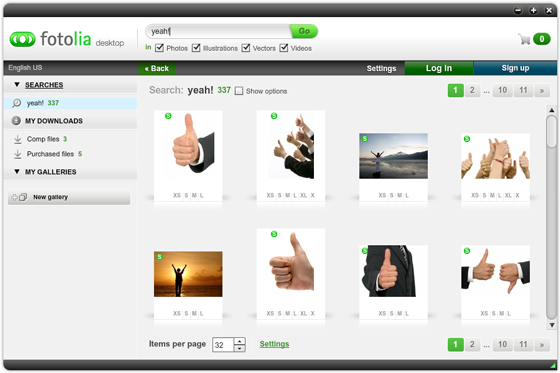
Hey! Another free AIR app! This time that ain’t no side project I made on my free time for some obscure users, but rather a big thingy for a big company. Namely Fotolia.

I did all of the coding part (ActionScript 3, Flex 4) and Steaw is responsible for the UI and all graphics. The app is basically a solution for power-users, providing most of the functionnalities of the website and adding some more (such as direct download and local library). Allowing you to search, browse preview and buy all types of medias, including video and vectors. You can also log into your account and store your favorites in a lightbox or create and fill galleries.

This is my first multi-lingual app: to this day it provides 13 translations including Japanese, Chinese and other funny looking languages!
Flex 4
This is also my first big real-life project with Flex 4 and I have to say it’s way better/easier than Flex 3. Really. What changed my life is the way it handles states and component customization via skins… Oh boy, this is easy!
AIR 2.0
Yep, using the brand new AIR 2.0.2, buddy. What for? Mainly for global error handling and the almighty openWithDefaultApplication (for both folder and medias). I’ve also heard this version of the runtime is faster and lighter, and we all like that.
OpenSource
As for every project I work on, I try to have some OpenSource bits so that anyone can benefit from the work and time I spent on it. I asked Fotolia if the AS3 API I was going to write could be OpenSource’d and guess what, they accepted. So here it is, based on the as3-rpclib and on the as3 Signals logic: fotolia-as3-api. I implemented most of (if not all) features of their official API so building an AS3 app off of that should be pretty easy, do so!
Go get it!
Yeah, go get it.