Fotolia Desktop

Hey! Another free AIR app! This time that ain’t no side project I made on my free time for some obscure users, but rather a big thingy for a big com­pany. Namely Foto­lia.

I did all of the cod­ing part (Action­Script 3, Flex 4) and Steaw is respon­si­ble for the UI and all graph­ics. The app is basi­cally a solu­tion for power-users, pro­vid­ing most of the func­tion­nal­i­ties of the web­site and adding some more (such as direct down­load and local library). Allow­ing you to search, browse pre­view and buy all types of medias, includ­ing video and vectors. You can also log into your account and store your favorites in a light­box or cre­ate and fill gal­leries.

This is my first multi-lingual app: to this day it pro­vides 13 trans­la­tions includ­ing Japan­ese, Chi­nese and other funny look­ing languages!

Flex 4

This is also my first big real-life project with Flex 4 and I have to say it’s way better/easier than Flex 3. Really. What changed my life is the way it han­dles states and com­po­nent cus­tomiza­tion via skins… Oh boy, this is easy!

AIR 2.0

Yep, using the brand new AIR 2.0.2, buddy. What for? Mainly for global error han­dling and the almighty open­With­De­fault­Ap­pli­ca­tion (for both folder and medias). I’ve also heard this ver­sion of the run­time is faster and lighter, and we all like that.

Open­Source

As for every project I work on, I try to have some Open­Source bits so that any­one can ben­e­fit from the work and time I spent on it. I asked Foto­lia if the AS3 API I was going to write could be OpenSource’d and guess what, they accepted. So here it is, based on the as3-rpclib and on the as3 Sig­nals logic: fotolia-as3-api. I imple­mented most of (if not all) fea­tures of their offi­cial API so build­ing an AS3 app off of that should be pretty easy, do so!

Go get it!

Yeah, go get it.

#air24h

This is how the Adobe AIR Chal­lenge (that took place in Paris this week-end) looked like: lots of young and fresh folks ready to spend 24 hours build­ing an AIR app.

Pretty happy the 3 apps I sup­ported all made it to the podium and can’t wait to play with Dig­i­tas’ Flickr app! Nice job, fellows.

See pics at Flickr, vids at Vimeo and wait for the apps: they should be out really soon.

Adobe AIR Challenge

The Adobe AIR Chal­lenge will begin tomor­row at 3pm in Paris, I hap­pen to be a part of the jury so I will have to review and judge all of the 15 apps made by the 15 2-member teams.

If you’re inter­ested fol­low the #air24h hash­tag on Twit­ter and watch the event (there will be a live broad­cast online)! A Flickr group also has been set up.

Make sure to also down­load and test the apps where they’re done!

Flex locale bugs

Warn­ing: techy post for once; sorry about that reg­u­lar folks. Look­ing for some­thing nicer than cryp­tic bug fixes? Have a look around here!

So here we go: I’m work­ing on a big multi-lingual AIR app within Flash Builder and just received the locale files from my client today (made with Lupo).

Couldn’t wait to see what it looked like in Japan­ese and in all other lan­guages sup­ported (13, to be pre­cise) so I copied the “locale” folder into my project, updated the “Addi­tional com­piler argu­ments” with “–locale de_DE en_GB en_US es_ES fr_FR it_IT ja_JP pl_PL pt_BR pt_PT ru_RU tr_TR zh_CN –allow-source-path-overlap=true –source-path=locale/{locale}” and refreshed the project. Which broke, say­ing “unable to open ‘[blablah]\frameworks\locale\en_GB’”.

Ouch”, I thought. Flex doesn’t sup­port Great Britain’s English?

In fact en_GB was not the only locale to break the project, so I Googled around and found that copy­ing your Flex frame­work en_US direc­tory and renam­ing it to the miss­ing locale could do the trick. For exam­ple I copied “C:\tools\flex4-air1.5.3\frameworks\locale\en_US” to “C:\tools\flex4-air1.5.3\frameworks\locale\en_GB” (I also did that for tr_TR, pt_PT and pl_PL)… Not the nicest solu­tion but lookin’ good anyways!

Almost.

I then stum­bled upon a lovely “Inter­nal build error”. But that’s cool.

I can’t explain how I found how to fix this but I did: some of the locale files (named Main.properties) where hav­ing lines with only a back-slash in them (\). I sim­ply removed those lines every­where I found them and that was it.

I don’t know if this has any­thing to do with Lupo, or else; but it’s fixed and yes: the app looks nice in Japan­ese, thank you.

Dok — AS3 Doc. UI

Meet Dok, my lat­est and nicest AIR app to this day!

Always look­ing for help when writ­ing AS3 for Flash, Flex and AIR? Think Adobe’s ref­er­ence is rich but brows­ing it sucks? Well, I did too. So I wrote this lit­tle thingy that loads, parses and caches help pages and then presents them in a slick and quick UI!

Since this app is only intended for devs and there­fore may not be very inter­est­ing to oth­ers, I decided it should look good. So I tried my best and worked hard on those pix­els and styles (col­ors and tex­tures inspired by that sweet clock)… Jump to the project page for life-size screenshot!

This project is absolutely Open­Source, from top to bot­tom. AS3 classes, MXML, Illus­tra­tor and Pho­to­shop files, PNGs and so on… Help your­self.

AIR: ELS slow?

This post is a techy one, so if you don’t write AIR apps or if you think this wouldn’t be enough to show off dur­ing cof­fee break I rec­om­mend some­thing fun­nier.

Work­ing on a big fat AIR app (more than 400 Mb) I noticed some­thing quite strange: using Encrypt­ed­Lo­cal­Store get/setItem meth­ods hap­pened to be slow, I mean very slow, but like, slow as hell (like 5 to 10 sec­onds per call) but only after launch­ing the app, and not after. Some­thing that I never noticed before ; nei­ther with other AIR apps, nor for this one before I added its heavy con­tent… And the tricky part is that it only occurred with a com­piled app, but not within ADL.

I googled a bit and found this thread which is mainly about the strongly­Bound para­me­ter for setItem, but its last post by Oliver Gold­man rang my bell:

The first time ELS is accessed the application’s sig­na­ture needs to be ver­i­fied, regard­less of whether or not strongly­Bound is set. If strongly­Bound is set, then the sig­na­ture is re-verified as the appli­ca­tion is run­ning. Either way, it’s expen­sive if you have a big application.

Small app: fast, fat app: slow as hell. Les­son learned…

And this is true both for Flash and HTML/JS AIR apps. So if you don’t need your data to be encrypted I highly rec­om­mend using Share­dOb­ject (or else) instead. As far as I’m con­cerned the first calls dropped from 5/10 sec­onds to a few milliseconds.

Bingo.

Weecast Player

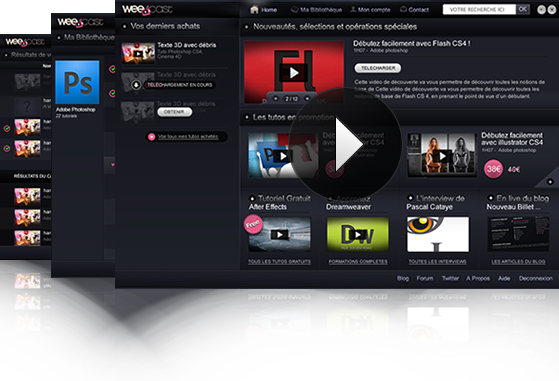
Dur­ing the last cou­ple of months I’ve been work­ing on a free AIR app for a French community-based site called Weecast. Its pur­pose is to allow users to sub­mit and/or buy screen­casts about your favorite apps and lan­guages (mostly Adobe’s and Microsoft’s, but also 3D ones’, OS’s and more).

Intro­duc­ing the Weecast Player!

The app allows you to browse your videos, watch them (4 view modes), search for more, drop com­ments and stars… I think that’s called an RIA, right? There’s also an offline mode, so you can access all your stuff anytime.

All of this is made in Flex+AIR. The visual iden­tity was made by Weecast ; thanks for the PNGs, folks!

By the way, some parts of it are actu­ally Open­Source, includ­ing:

If you don’t know Weecast yet I highly rec­om­mend you go visit their site, grab an account and the player, enjoy free videos, and then buy some! Now if you don’t under­stand French… Well, learn it!

BaseObject

I was talk­ing about it, here it is!

This class will come in handy every time you work with syn­chro­nous SQLite data­bases in an AIR project. It’s a real-world imple­men­ta­tion of the Dynam.ize util­ity I pre­sented ear­lier… I will show you an exam­ple of how to work with it, with sim­ple sub-classes. Let’s go!

First things first.

I need to open my data­base and pro­vide that con­nec­tion to BaseObect:

var sqlCon:SQLConnection=new SQLConnection();
sqlCon.open(File.applicationDirectory.resolvePath('data.sqlite'));
BaseObject.defaultConnection=sqlCon;

We need clients!

Now, let’s con­sider a data­base with a “client” table (pretty cre­ative, right?), those clients have a name, a URL and a gen­der (male/female), and of course, an ID. So we have a “client” table with 4 fields: id, name, url, male (which is a Boolean: true=male, false=female).

I have mapped a BaseOb­ject sub-class to this table (I will show you how in a few moments), so I can now cre­ate a new client in a pretty sim­ple fashion:

var myClient:Client=Client.create({name:'Joe', url:'http://www.yep.com', male:true});

Cool, I now have a Client instance I can work with and a line has been added in my “client” table. What if I wanted to change its name? Easy.

myClient.setName('Mark');

The “name” field has been updated. Let’s check that.

trace(myClient.getName());

Traces “Mark”? Good. OK, what about updat­ing the URL and name at the same time? Two queries? Nope!

myClient.update({name:'Jack', url:'http://www.yo.net'});

Now let’s grab a client via his ID.

var c1:Client=Client.getFromID(1);

Sim­ple. But what if I wanted to grab more than one client, fox exam­ple what if I wanted all male clients?

var males:Array=Client.getFromQuery('SELECT * FROM client WHERE male=@male', {'@male':true});

You can now loop through this array and inter­act with the Client instances it contains…

What’s the trick?

Noth­ing too hard to under­stand. Client is a sub-class of BaseOb­ject that sim­ply exposes some of its sta­tic and instance meth­ods (get­Fro­mID, get­From­Query, cre­ate, update and so on). It also casts BaseOb­ject return val­ues to the right type: Client. For exam­ple, this is how get­Fro­mID works:

public static function getFromID(id:uint):Client {
	return BaseObject._getFromID(getTableData(), id) as Client;
}

Now you might won­der what this get­Table­Data method is. Well it returns data about the table to which Client is bound to, like that:

public static function getTableData():TableData {
	if (!_tableData) _tableData=new TableData('client', Client, ['name', 'url', 'male']);
	return _tableData;
}

See? We define the table name (client), the cur­rent class (Client) and the fields we need to han­dle (name, url and male)… That’s it.

Our clients bought cars…

That’s right, so we should have a “car” table, right? With id, name, brand, cli­en­tID and pur­chase­Date we should be good. Its Table­Data would look like that:

 new TableData('car', Car, ['name', 'brand', 'clientID', 'purchaseDate']);

Note: I didn’t list id as BaseOb­ject sup­poses there’s always an id field.

OK, so our clients bought cars, and we’d like to know who bought what. Let’s write a method in Client to do that:

public function getCars():Array {
	return Car.getFromQuery('SELECT * FROM car WHERE clientID=@id', {'@id':id}));
}

That works, cool. But we can do bet­ter, we could cache this Array so we don’t query every time we need it ; there’s a tech­nique for that:

public function getCars(force:Boolean=false):Array {
	return (hasCache('cars') && !force) ?
		getCache('cars') :
		setCache('cars', Car.getFromQuery('SELECT * FROM car WHERE clientID=@id', {'@id':id}));
}

Done. Opti­mized.

We can now see which cars our first client bought:

var c1cars:Array=c1.getCars();

We could also imple­ment the oppo­site: retriev­ing a Client form a Car instance:

public function getClient():Client {
	return Client.getFromID(this.getClientID());
}

Notice how I used get­Cli­en­tID? This refers to the table’s cli­en­tID field and returns it.

That’s a wrap.

Well that’s pretty much it, I think I cov­ered the basics!

If you want to play with it, get the class/demo project and tell me what you think. I’ve bun­dled Client, Car and some exam­ple uses…

FileWatch

I wanted to try Flex 4 with a “real life” project so I wrote this lit­tle thing. Rough draft.

FileWatch

The app will allow you to mon­i­tor files changes: select a text file and you’ll be prompted when it’s updated. Basic. By the way, did I say “rough draft” before?

Every­thing in it is Open­Source, from the Illus­tra­tor files to the MXML and CSS stuff, so play with it! For those who only want the .air, here it is.

Now, why is it cool?

  • Build with the brand new Flex 4 (Gumbo) framework
  • Uses a home-brewed Icon­But­ton class, because Gumbo doesn’t pro­vide any
  • Uses the new Spark cus­tom skins logic (on But­ton, Scroll­Bar and more…)
  • Uses the new states’ logic and transitions
  • Based on as3corelib’s File­Mon­i­tor class
  • Shows you how to build a multi-instance AIR app
  • Con­tains Illustrator/Photoshop UI files

And why is it not that cool?

  • Prob­a­bly still buggy, wait for updates!
  • Flex 4 is not done yet, so the code might break at any time
  • No icons yet
  • No or very few comments
  • Pretty use­less app!

If you’re try­ing to learn Flex/Flex 4 or won­der­ing what’s new in it and how to use it you should defin­i­tively give it a go…

Have ques­tions? Drop’em!

Boks–A Visual Grid Editor

Intro­duc­ing Boks, my lat­est and most ambi­tious AIR app to this day!

Do you design web pages? Do you write HTML and CSS? Ever heard about the Grid Sys­tem and Blue­print CSS? Thought it was a pain to imple­ment? Think again, fool!

Boks is some kind of WYSIWYG to help you setup a grid and base­line rhythm, build and fill your lay­out and export all this to HTML and CSS in no time.

Got your own CSS style already? No prob­lemo, Boks can use them and even­tu­ally merge and com­press them within a sin­gle “screen.css”. Your styles use images? Sim­ply point to your asset direc­tory and it will be included too! Afraid of break­ing the base­line rhythm with you ran­domly sized images? Just select the “Add JS to fix base­lines” option and you’re good to go!

Enough. Just go grab it (or just have a look at the lovely screen­shots) and send feedback!

Apr 01, 2009: Update! I’ve done some wacky video screen­casts that can help you under­stand every­thing about Boks, go and have a look! Yes, the sound is not perfect.